
Run your school from one place.
Students, attendance, fees, exams and report cards, the timetable, homework, staff, payroll and the school buses in one app, for schools and coaching centres in India. It opens on your school's own address, on a laptop or a phone, and there is an Android app for your staff and for parents.

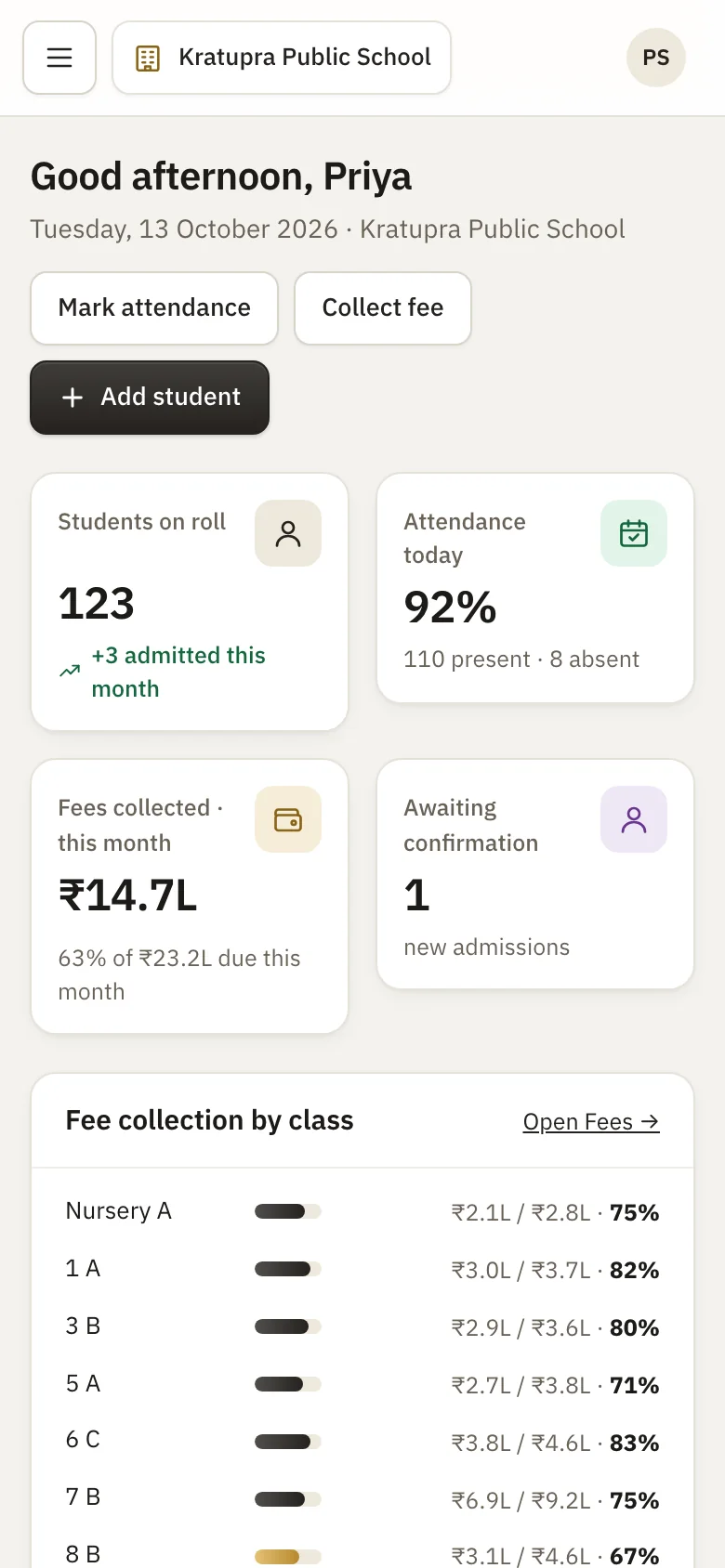
A sample school. The names and numbers are made up.

Students and admissions
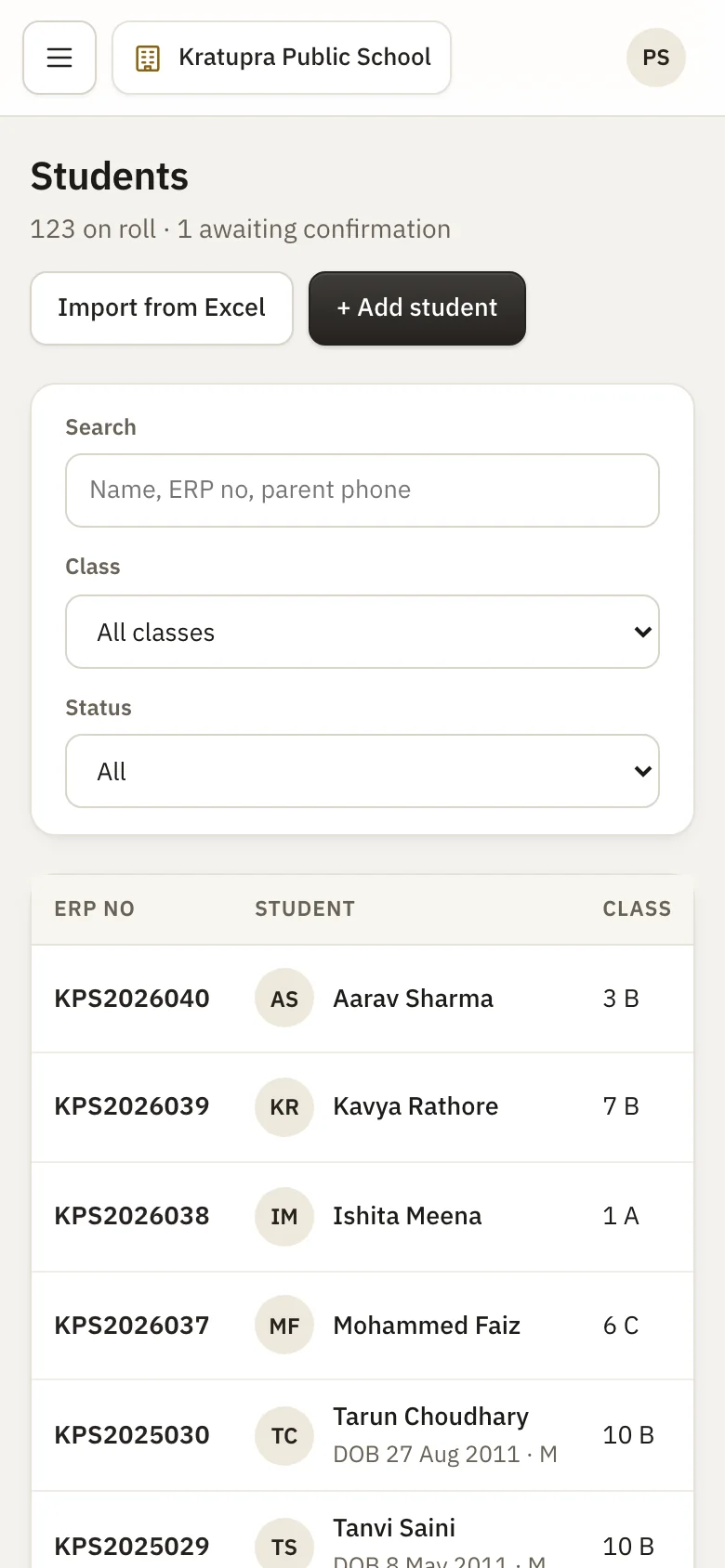
Every student's record, found in a second.
Class, roll number, parent and phone, with what is due and how often they come, on one line.
- Search the way the office does. By name, ERP number or the parent's phone.
- An ERP number for everyone. Each student and member of staff gets one when they join, like KPS2026001, and it shows on ID cards, receipts and payslips.
- A whole class from Excel. Download the template, fill it in, upload it: every row is checked first and the school is told exactly which rows need fixing, so nothing goes in half done. Staff accounts come in the same way.
- Photos, documents and ID cards. A photo and certificates on each record, and ID cards for students and staff printed from them: lanyard cards in Arc, Wave or Chevron, or wallet cards, in the school's colours, with a back that carries a QR code, the terms and the school's address. The design is set once; a whole class prints as a sheet, or one card at a time.
- Scan a card, see the student. The QR code on each ID card is encrypted, so it can't be copied or made up. Anyone who scans it sees that the card is genuine: the student's photo, name, ERP number, class and whether they are still on the roll. The principal or school admin, signed in, sees the whole record with fees and receipts.
- The office has the last word. A student added by a teacher or the accountant waits until the school admin or the principal confirms.
- Transfers and withdrawals kept. A student who leaves is marked, not deleted.


Attendance
A class marked in a few taps.
Everyone starts as present. The teacher taps only the ones who aren't.
- Present, absent, late or on leave, with the count of each as you go.
- On the teacher's phone, in the classroom. Nothing to install.
- Or scan the ID cards. In the Android app, the teacher scans each student's card in turn and the mark is saved as it is read, with the student's name and photo to confirm. A card from another class is refused.
- At the gate and on the bus. A handheld scanner at the school gate, or a phone, reads each card as students come in and go home, and the bus attendant scans them on and off the bus. Parents get a notification each time, and the class is marked present from the gate.
- Mistakes can be put right. Open the day again and change it.
- It adds up by itself. Each student's attendance shows on their record and today's on the dashboard.
- Parents told the same day. On the Advanced plan, if the school turns it on, a parent gets a WhatsApp message when their child is marked absent.

Fees
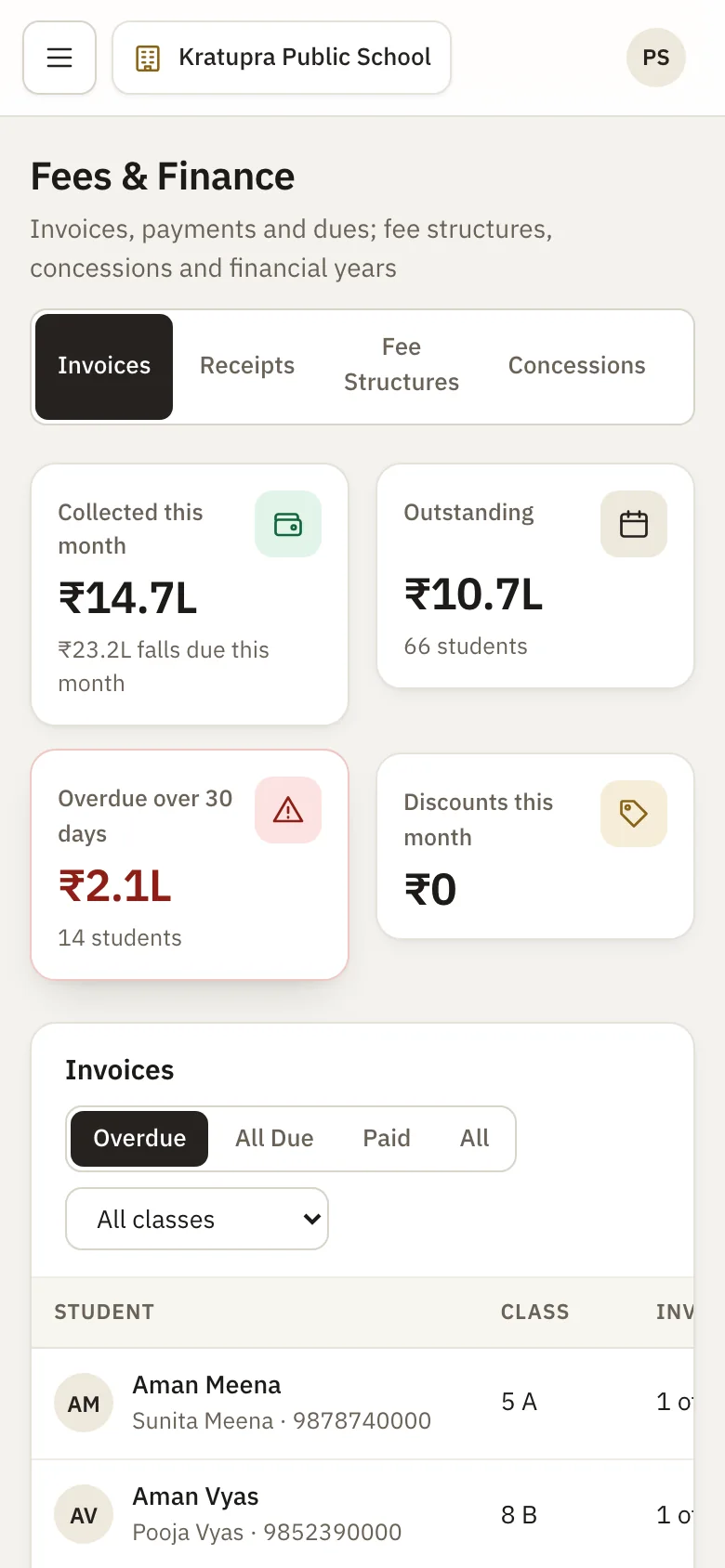
Who has paid, who hasn't, and by how much.
Without a register, and without a spreadsheet that only one person understands.
- Fee structures by class. What a class pays, term by term, under heads like tuition and transport. A whole class is invoiced from it in one step.
- Concessions taken off for you. A sibling or staff discount, as a percentage or an amount, on every invoice it applies to.
- Cash, UPI, card or cheque, with part payments, and a numbered receipt for each, to print or send to the parent on WhatsApp.
- Dues in order, one line per student. Who is overdue and by how many days, with the parent's phone beside it. Collect opens all of that student's invoices, paid and unpaid, and takes the payment there.
- The day's collection, by how it was paid, to match against the cash box and the bank.

Exams and results
Marks in, grades and ranks out.
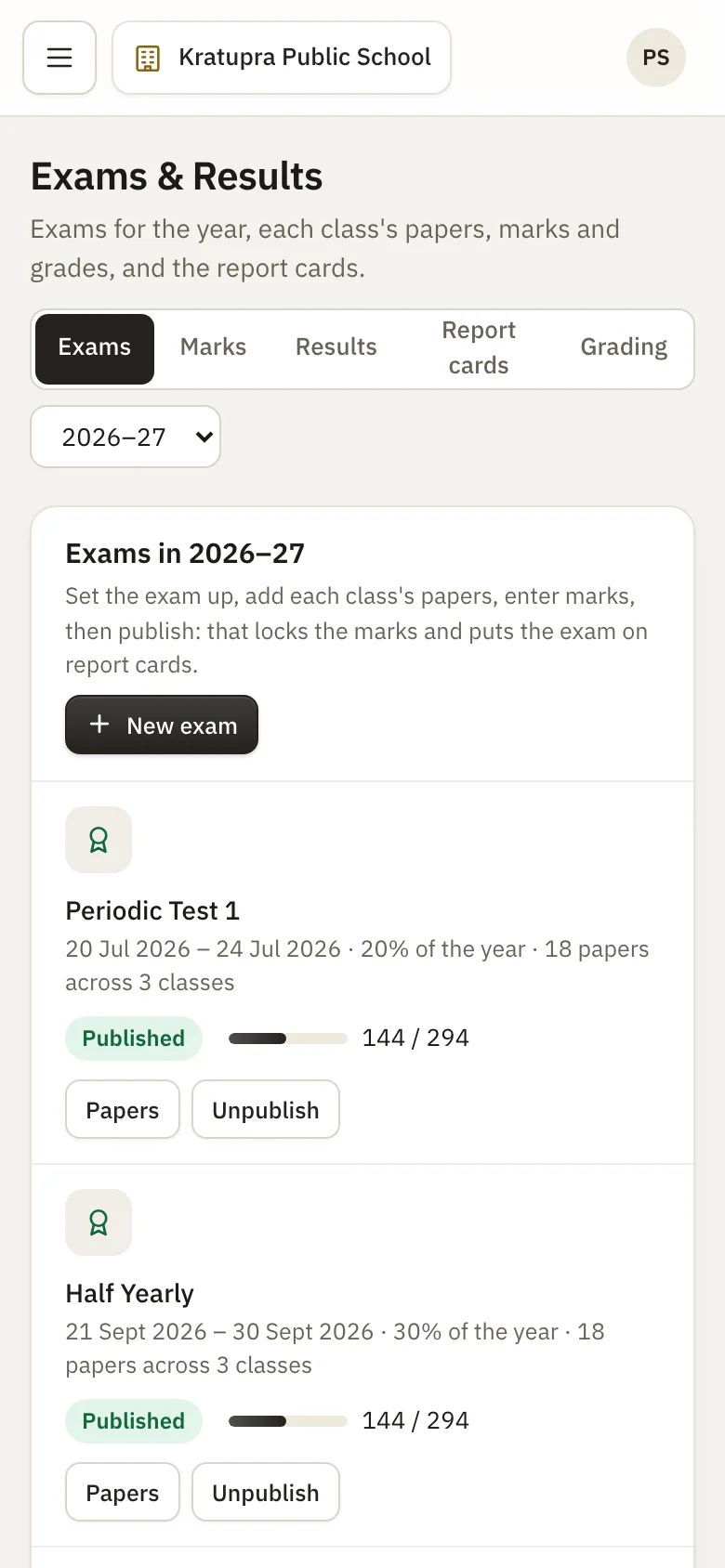
Set up the year's exams once; teachers enter marks for their class in a grid, and the results work themselves out.
- The year's exams, each with its papers per class: out of how many marks, the pass marks, and graded areas like Art and Work Education that take a grade instead.
- Marks entered in a grid, a class at a time, with absent students marked as such.
- Grades from your scale. The CBSE eight-point scale to begin with, A1 to E with grade points, changed to the school's own if it differs.
- Totals, percentage, rank and result for every student, as the marks stand, and a remark from the class teacher.
- Published when ready. Publishing locks the marks and puts the exam on the report cards; it can be reopened to correct something.

Report cards
The year's report card, printed in one go.
Every published exam side by side, subject by subject, with the overall for the year.
- Weighted the way the school weighs it. Each exam's share of the year is set once; a subject failed in one exam can be made up in the next.
- Everything a parent looks for. Marks, grades, the overall, co-scholastic grades, the teacher's remarks, the year's attendance, the grading scale and signature lines.
- Four designs, in the school's colours. A board-style table, a modern card, a grades-only card for primary classes, or a certificate-style marksheet. Chosen once in settings; everyone prints the same.
- A whole class or one student. One card to a page for the class, or a single student's from their record.

Transport
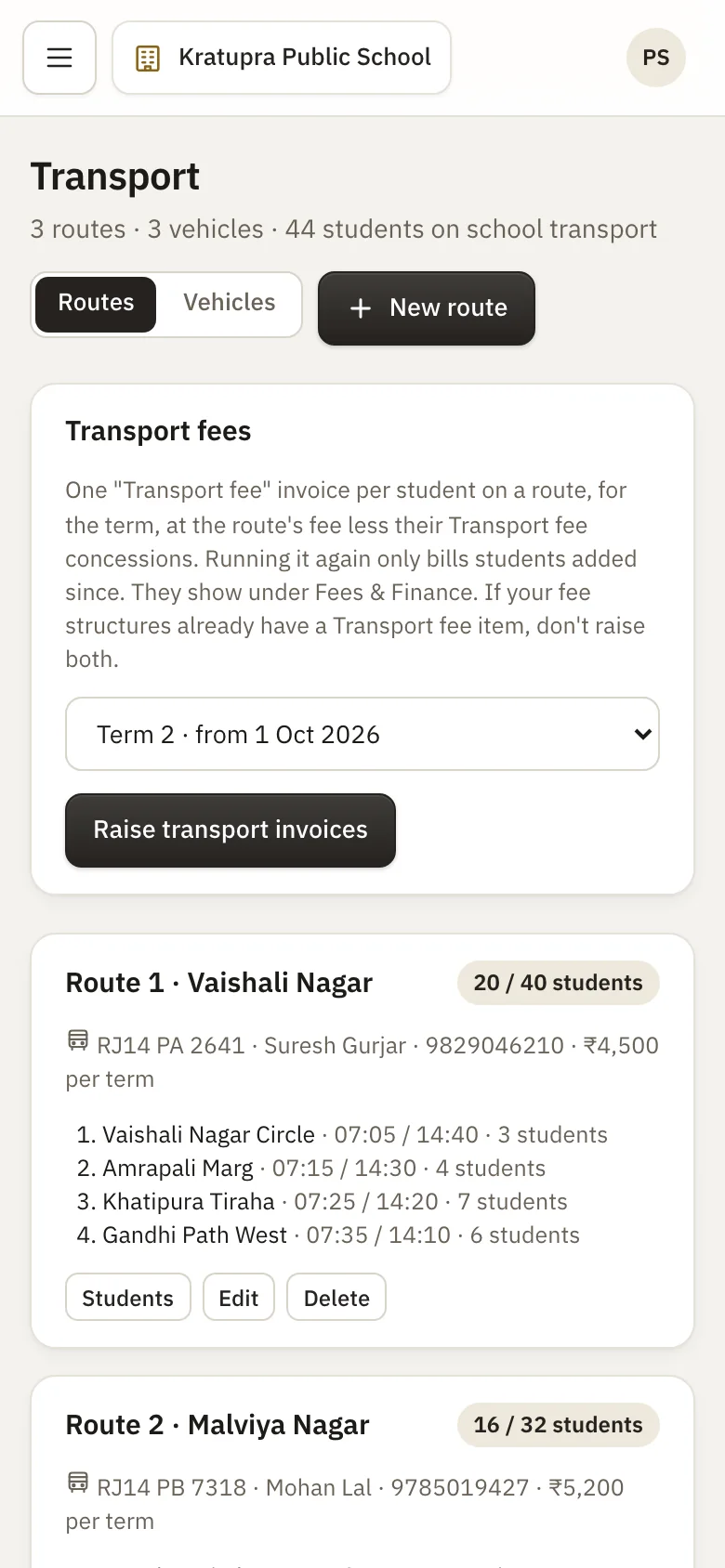
Every bus, every stop, every child on it.
The routes the school runs, who rides them, and the transport fee collected with the rest.
- Routes with their stops in order, each with its pickup and drop time, and the bus or van that runs it.
- A student on a route at a stop, from their record. A bus never takes more students than it has seats.
- A list for the driver. Who gets on at each stop, with the parent's phone, printed from the route.
- The vehicles and their papers. Number, seats, driver and helper with their phones; insurance and fitness dates that turn amber a month before they run out.
- Transport fees by route, invoiced each term for everyone on it, less their concessions, and collected and receipted like any other fee.
And the rest of the school
The classroom, the staff room and the notice board.
All in the same app, under the same sign-in.
Class calendar
Each teacher's classes for the week, with the time and room. A teacher or a class is never booked twice for the same time, and a weekly class can be moved or cancelled one week at a time.
Homework and lesson plans
Homework and classwork given to a class, with who handed it in. What each teacher plans to teach, and what was taught once the class is done.
Class tests
A short test for a class, with what it covers and the marks it is out of, and each student's marks entered after. Term exams and report cards are above.
Staff attendance and leave
The staff register, marked each day. Leave asked for in the app and approved by the admin or the principal, and approved leave fills the register.
Payroll and payslips
Each month's salaries worked out from attendance and leave, with PF, professional tax and TDS as you set them. Each person sees their own payslip.
Notices and WhatsApp
Notices for everyone, the staff or the parents, pinned or with an end date, and sent on WhatsApp if you choose. Fee receipts and leave decisions go out on it too.
Learning, coins and Our Stars
Lessons students want to open, and a spotlight on what they achieve.
A learning library inside the same app, for students, parents and staff.
Lessons that read like a book
Teachers write a lesson in five easy steps, with pages, key ideas and a question at the end, or share a PDF, picture or video. Every school starts with five ready-made lessons for classes 5 to 12 and their parents.
Shared with the right people
Give a lesson to the whole school, chosen classes or batches, a few students, or staff roles. Students see their own shelf, mark what they have learned and see how far they have come.
Coins and a wallet
Lessons can be free or unlocked with coins, one coin to a rupee. Parents add coins by the school's UPI QR or online; the office confirms each payment, and every coin in and out is in the wallet.
Our Stars
Celebrate a student's or a team's achievement with a poster, for every family to see in the app and on the web.
Your school's address
One app. Each school in its own.
Your staff open the school's own address and see only your school.
An address of its own
Each school gets one, like kps.kratupra.com. Staff sign in there, on any laptop or phone.
Each person sees their part
The school admin sees everything, and the principal nearly all of it. Teachers handle attendance, homework and their classes. The accountant handles fees, transport fees and payroll.
Schools kept apart
One school's students, fees and staff are never shown to another. A sign-in works at its own school only.
Coming next
What we are building after this.
These are planned and not built yet. Tell us which your school needs first.
On Google Play and the App Store
The Android app is downloaded from this page today. Next, the stores, and the iPhone app.
Say it instead of typing
“Class 7 B, everyone present except Kabir and Sana.” Checked by you before anything is saved.
The app
Kratupra ERP on a phone, for staff and for parents.
The same school, the same sign-in, in an app on Android. Staff get their screens; parents see their own child. The app wears your school's logo and colours.
For your staff
Attendance in the classroom, students and fees at the counter, leave, notices, payslips and the rest, by role, as on the web. Sign in with the email or ERP number and password you already have; the app finds your school.
Download for AndroidVersion 1.0.0 (build 10) · 23 MB · Android 7.0 or newer · iPhone to follow · Phone older than 2019? Get this one (21 MB)
For parents
The same app, or the school's address on the web. The school office gives a parent a password from the student's record; the parent signs in with their mobile number and sees their child's attendance, homework, timetable, class tests, exam results and fees due, the Learning library, the coin wallet and Our Stars, with a switcher when they have more than one child at the school. A forgotten password is reset with a code on WhatsApp.
Download for AndroidThe parent app is part of the Advanced plan.
How to install on Android
- Tap Download for Android on your phone and wait for the file to finish.
- Open the downloaded file. The first time, Android asks whether your browser may install apps: tap Settings and allow it.
- Tap Install, then open Kratupra ERP and sign in.
The app is signed by Kratupra; to check the file you downloaded, its SHA-256 is 92100bd7707778f635f5f315c7cb9ba87fe29b2f72144034df96ed2d3a9bd629 (for older phones, 1591964cdb5db0b2cdf73fe05ac5399cd06351427d7011bfda726a3d9f7e88c7). Updates install over the old version and keep you signed in. Also coming to Google Play and the App Store.
Pricing
One price for each student, for the whole session.
Choose the plan with the modules your school needs. A session is one academic year.
Basic
₹99
per student, per session
The office's daily work.
- Students and admissions, with ERP numbers, photos and documents
- Attendance, on a laptop or the teacher's phone
- Fees: structures, concessions, invoices, receipts and dues
- Notices and announcements
- ID cards, in the school's own design
- The dashboard
- The Android app for your staff
- Sign-ins for the admin, the principal, teachers and the accountant
- Your school's own address
Plus
₹149
per student, per session
Basic, and the classroom's and the staff's work.
- Everything in Basic
- Class calendar: the week's classes for each teacher and class
- Homework and classwork, with who handed it in
- Lesson plans, and what was taught
- Class tests and marks
- Exams and results: the year's exams, marks, grades, ranks, and report cards printed for a class or a student
- Staff attendance and leave
Advanced
₹199
per student, per session
Plus, payroll, WhatsApp, transport, and each new module as it is ready.
- Everything in Plus
- Payroll and payslips
- WhatsApp to parents and staff: notices, absences, fee receipts and leave decisions, plus the cost of the messages
- Transport: routes, stops and vehicles, students on them, and transport fees
- The app for parents, and the same on the web: their child's attendance, homework, timetable, tests, results and fees due
- Learning: lessons that read like a book, coins and a wallet, and Our Stars
- Say it instead of typing Coming
Prices are in Indian rupees, for each student, for one session. WhatsApp messages are charged on top, at what Meta charges for them, billed each month for the messages the school sent; the school sees every message in its WhatsApp log. Modules marked Coming are planned and not built yet; they are described under Coming next. The Android app is included with every plan.
Questions
Good to know before you start.
Do we need to install anything?
No. Kratupra ERP opens in the browser on any laptop or phone, at your school's own address, with nothing to install and nothing to update. If your staff would rather have an app on the phone, there is one for Android; parents use the same app.
Can teachers use it on their phones?
Yes. It is made for phones as well as laptops, so a teacher can mark attendance in the classroom, and the office can look up a student or a fee from anywhere. The Android app does the same, with the school's own logo and colours on it.
Do parents get anything?
On the Advanced plan, parents get WhatsApp messages from the school: notices, a message when their child is absent, and a receipt when they pay. The school chooses which of these to send, and pays for the messages at what Meta charges. Parents also get the app, and the same on the web: the office sets a password on the child's record, and the parent signs in with their mobile number to see attendance, homework, the timetable, tests and results, fees due (and pay them online where the school takes payments), notices, the Learning library, the child's coin wallet and Our Stars.
Does it work for a coaching centre?
Yes. When your institution is set up as a coaching centre, you add courses such as JEE 2027, NEET or Class 10 Maths, each with its own batches and seat limits, and the screens speak of courses, batches and the centre instead of grades, sections and the school. Attendance, tests, fees in instalments, notices, Learning and the parent app work the same way, and you choose only the features you need.
How is the price worked out?
By the plan you choose and the number of students: ₹99, ₹149 or ₹199 for each student, for one session. A session is one academic year. On Advanced, WhatsApp messages are charged on top, at what Meta charges for them.
Who can see our school's records?
Only your own staff, and each of them only their part: the school admin sees everything, teachers don't see fee figures, the accountant doesn't see attendance, and salaries are seen only by the admin and the accountant. No other school sees anything of yours. More in our privacy policy.
What if we want to stop?
Ask us, and we switch the school off or delete it with everything in it. How that works is on the school deletion page.
How do we start?
Book a demo. We show you the ERP working with a sample school, then set up your school's address and the admin's sign-in. Your admin adds the classes, the staff and the students, and the fee structures.
Book a 15-minute demo
Kratupra ERP is in early access. If you run a school or a coaching centre, write to us: we will show it working with a sample school, and ask what your office needs most.
Book a 15-minute demoOr write to founder@kratupra.com