
Kratupra ERP · for schools and coaching centres
Less time on records. More time on students.
Admissions, attendance, fees, exams and report cards, transport, staff and payroll, and messages to parents: on a laptop in the office and on every teacher's and parent's phone.
The tour shows a sample school's students, attendance, fees and report cards. No sign-up. Prefer to chat? WhatsApp us.
- Already in use in Gwalior
- No ads or tracking
- Your school's data is never sold
- VAPT tested · DPDP assessed · Oct 2026
- Made in India

Product tour
See it working, screen by screen.
A sample school's real screens, on a laptop and a phone. The names and numbers are made up. Click a screen to enlarge it.
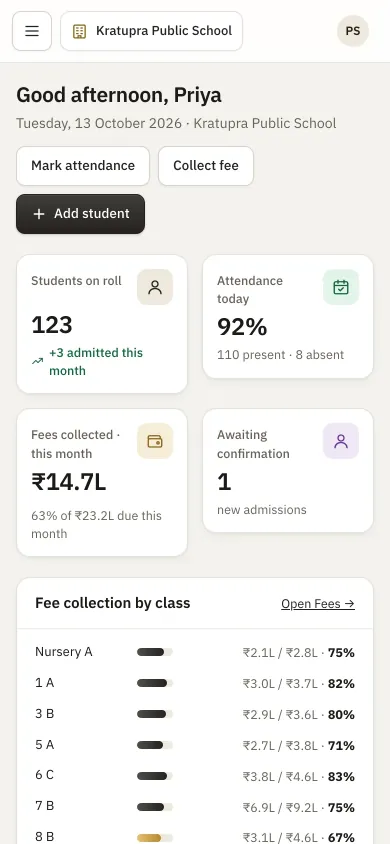
The day at a glance.
Students on roll, today's attendance, fees collected this month, each class's fee collection and the latest admissions, on the first screen the office opens.
- What needs attention today: absentees, dues, admissions waiting
- The same on the principal's phone
- Every figure opens the list behind it
Every student's record, found in a second.
Search by name, ERP number or the parent's phone; filter by class and status. Each record has the photo, documents, ID card, fees and attendance.
- Admissions confirmed by the office
- A whole class in from Excel, checked row by row
- Transfers and withdrawals kept, never deleted
A class marked in a few taps.
Everyone starts present; the teacher taps only the ones who aren't. Or scan ID cards in class, at the gate and on the bus.
- Present, absent, late or on leave
- Parents told the same day
- Each student's percentage adds up by itself
Who has paid, who owes, student by student.
Fees come from each class's fee structure, less concessions. Every receipt is numbered in order and can't be rewritten.
- Invoices raised for a class at once
- Receipts by cash, UPI, cheque or bank
- Overdue list for follow-up
Marks in, report cards out.
The year's exams, papers and marks; grades, ranks and CGPA worked out; report cards printed in the school's own design for a class or one student.
- Co-scholastic grades and remarks
- Results by class and subject
- A whole class prints as one PDF
- A QR on each card that confirms it is genuine
Every bus, route and stop.
Vehicles with their papers' due dates, routes with stops and times, the students on each, and transport fees per term.
- Seats checked against the vehicle
- Who boarded and who got off, by scanning cards
- Parents see the route and pickup time
On the phone
The same school, in your pocket.
Everything in the tour above also opens on a phone, in the Android app or any phone browser. A few more of its phone screens: scanning ID cards at the gate, checking a student or a report card from its QR, and a teacher's payslip. Tap one to enlarge it.
How it works
From sign-up to a running school, in four steps.
No servers to buy and nothing to install in the office. We set it up with you, and your staff carry on in the school's own app.
- 1
Your school's own address
We set up your school at its own address, like sunrise.kratupra.com, with your crest, colours and photo on the sign-in.
- 2
Bring your records in
Students and staff come in from Excel, every row checked first. Classes, fee structures, the timetable and the year's calendar are set once.
- 3
Everyone signs in
The office on a laptop; teachers and parents on the Android app, with their email, ERP number or mobile number. Each person sees only their part.
- 4
Run the day
Attendance in class, at the gate and on the bus; fees and receipts; homework, exams and report cards. Parents are told as it happens.
Your school, not ours
Your crest, your colours, your school's name on every screen.
Parents and staff sign in on the school's own address and in the school's own app colours. Kratupra stays in the background, in small print.
Pick a school to see it change:
- The school's own address, like sunrise.kratupra.com, and its crest on the sign-in, the header, ID cards, receipts and report cards.
- Its colours and photo on the app's sign-in, so parents see their school, not a software company.

ID cards and report cards, printed in the school's own design.
The design is set once: the layout, the colours, the crest and the principal's signature. Then a whole class prints in a click, one card or report card to a student.

- Lanyard cards in Arc, Wave and Chevron, or wallet cards
- Staff ID cards too
- The QR is encrypted, so a card can't be copied or made up
- Scanned in class, a card from another class, or of a student who has left, is refused
Data integrity and security
Records nobody can quietly change.
A paper register, a shared Excel file or old software on one office computer can be altered by anyone who gets to it, with no trace of who did it or when. Marks, attendance and fee records are the school's word to parents. Kratupra ERP keeps them honest.
Security tested and DPDP assessed by Bachao.AI Kratupra ERP went through Bachao.AI's vulnerability assessment and penetration test (VAPT) and its assessment against India's Digital Personal Data Protection Act, 2023, on 29 October 2026. These are independent assessments, not a government certification, and not a guarantee of legal compliance. Backups to Google Drive run only once the school has connected its Drive, and are as safe as that Drive account is.Registers, Excel and old software
- Anyone can overwrite a mark or a fee entry
- No record of who changed what
- One lost laptop or pen drive, and years of records go
- Receipt books and invoice numbers that can be skipped or reused
Kratupra ERP
- Each person can change only their own part
- Every change keeps who made it and when
- A copy in the school's own Google Drive every night
- Receipts and invoices numbered in order; nothing paid ever disappears
Each school's data is kept apart from every other school's, every page runs over HTTPS, passwords are stored only as one-way hashes, and automated tests of attendance, fees, exams and access run before every update. An update that fails them doesn't go out.
How your school's data is handled
Only your own staff, each their part: the admin sees everything, teachers their classes and no fees, the accountant fees and no attendance, salaries only the admin and the accountant. Parents see only their own child.
Once the school connects its Google Drive, a full copy goes there every night, in the school's own account. If records are ever lost, we restore them from those copies; receipts and invoices are only ever added back, never changed.
Once the school connects its Google Drive, the same nightly update keeps a Google Sheet of all your records there, so your data is never locked in. It holds students' personal details, so it is private to the Google account that connected it until the school chooses to share it. The school decides who sees it, and the ERP never shares it.
Ask us and we switch the school off, or delete it with everything in it. How a school is deleted · Privacy policy
Trust from parents
Parents see their child's day, as it happens.
The school's app on the parent's phone, in the school's name: the day's attendance, homework, notices, marks and fees, each the moment the school records it. Parents stop wondering, and stop calling the office to ask.
- Present or absent, the moment the class is marked, with a WhatsApp message to the parent of a child marked absent (Advanced plan).
- Homework, the timetable, class test marks, exam results and report cards.
- Fees due, and every receipt, as soon as a payment is taken.
- Notices and alerts from the school, on the phone's lock screen.
- When their child reached school, boarded the bus and got off it: the ID card is read at the gate by a handheld scanner or a phone, and on the bus by the attendant's phone.
Pricing
One price per student, for the whole session.
Estimate your school's cost from the published prices. Nothing is charged per teacher, per login or per module inside a plan.
What this estimate includes, and what it doesn't
- One session
- One academic year, usually April to March. The price is for the whole session, not per month; the monthly figure is only that price divided by twelve.
- GST
- The prices are before GST. GST is added at the rate in force, and shown on your invoice.
- Minimum
- We quote for at least 50 students. Below that, write to us.
- Setup and support
- Included at no extra charge: your school's address and admin sign-in, help bringing in your Excel records, and email support.
- On Advanced, WhatsApp messages are charged on top, at what Meta charges for them. Everything else in a plan has no per-message charge.
- Renewal
- Each new session is billed for the students then on roll, at the prices published at that time. We tell you before it starts.
- Students who join mid-session
- Added at the same per-student price, for the months left in that session.
The calculator gives an estimate. Your quotation, with GST, is confirmed in writing before you start.
Questions
Good to know before you start.
Do we need to install anything?
No. It opens in the browser on any laptop or phone, at your school's own address. Staff and parents can also use the Android app.
Can we bring our existing records from Excel?
Yes. Students and staff come in from an Excel template. Every row is checked first and the problems are listed row by row, so nothing goes in half done.
Does it need the internet?
Yes, it works online, on any connection including mobile data. Your records are kept on our server, not on one office computer, and once your Google Drive is connected a nightly backup goes there too.
How do we start, and who helps our staff?
Book a 15-minute demo: we show you the ERP with a sample school, then set up your school's address and the admin's sign-in. Your admin adds classes, staff, students and fee structures, and we answer questions by email as you start.
Do parents get an app?
Yes, on the Advanced plan: attendance, homework, timetable, tests, results, fees due and notices, signing in with their mobile number.
How do we get help?
Write to support@kratupra.com, or to founder@kratupra.com for anything about your school's account or plan.
Our vision
Technology that everyone in a school can understand and trust, so every school can give each student the attention they deserve.
Explain everything
No black boxes. Every fee, mark and rank shows how it was worked out.
Built for India
Indian boards, fees and sessions, and the way schools here actually work.
Simple first
If a feature needs a manual, we haven't finished designing it.
Respect for data
A school's data belongs to the school. We protect it and never sell it.
Contact
Talk to us.
Tell us what you need and we will write back.
Schools and coaching centres
Kratupra ERP working with a sample school, and your questions answered.
Book a 15-minute demo →Help with Kratupra ERP
Questions about your school's account, the app or your data.
support@kratupra.comWork with us
Partner with us, write about us, or back what we're building.
founder@kratupra.com